
3.1 KiB
Authenticate KeyCloak against OpenLDAP
!!! warning This is not a complete recipe - it's an optional component of the [Keycloak recipe]https://geek-cookbook.funkypenguin.co.nz/recipes/keycloak/), but has been split into its own page to reduce complexity.
KeyCloak gets really sexy when you integrate it into your [OpenLDAP]https://geek-cookbook.funkypenguin.co.nz/recipes/openldap/) stack (also, it's great not to have to play with ugly LDAP tree UIs). Note that OpenLDAP integration is not necessary if you want to use KeyCloak with [Traefik Forward Auth]https://geek-cookbook.funkypenguin.co.nz/ha-docker-swarm/traefik-forward-auth/) - all you need for that is [local users]https://geek-cookbook.funkypenguin.co.nz/recipes/keycloak/create-user/), and an OIDC client.
Ingredients
!!! Summary Existing:
* [X] [KeyCloak]https://geek-cookbook.funkypenguin.co.nz/recipes/keycloak/) recipe deployed successfully

New:

* [ ] An [OpenLDAP server]https://geek-cookbook.funkypenguin.co.nz/recipes/openldap/) (*assuming you want to authenticate against it*)
Preparation
You'll need to have completed the [OpenLDAP]https://geek-cookbook.funkypenguin.co.nz/recipes/openldap/) recipe
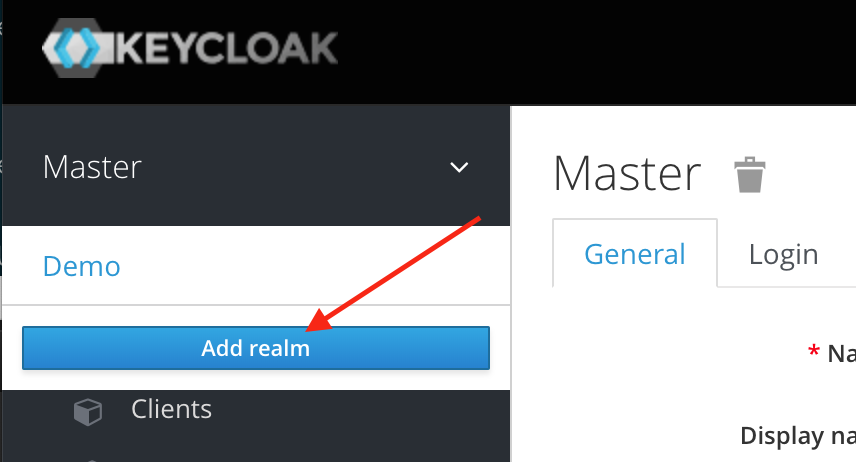
You start in the "Master" realm - but mouseover the realm name, to a dropdown box allowing you add an new realm:
Create Realm
![KeyCloak Add Realm Screenshot]https://geek-cookbook.funkypenguin.co.nz/images/sso-stack-keycloak-1.png)
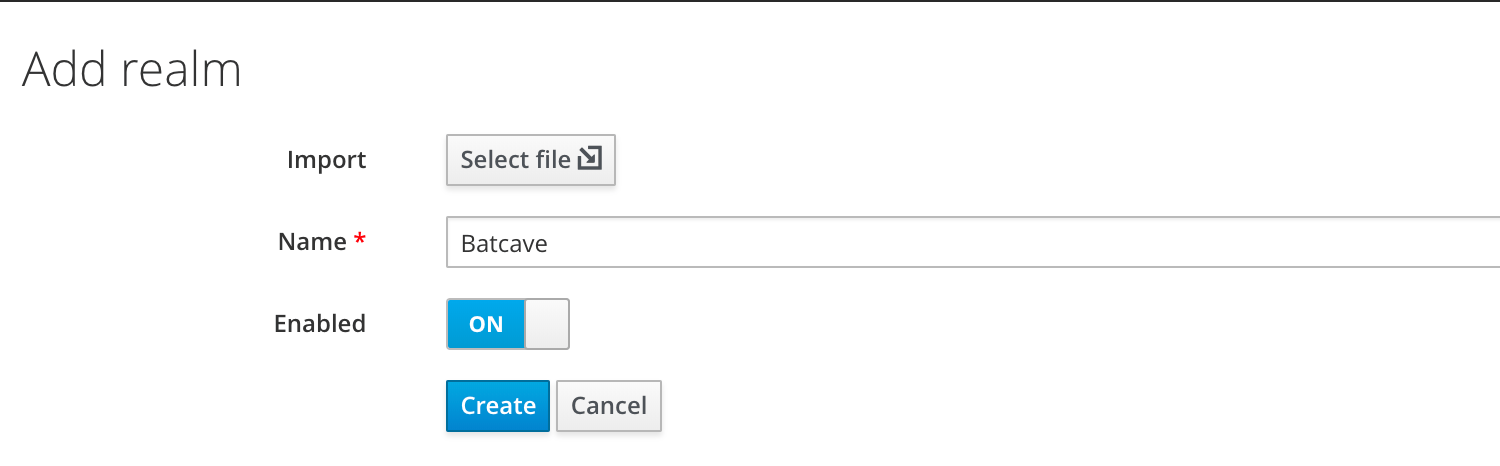
Enter a name for your new realm, and click "Create":
![KeyCloak Add Realm Screenshot]https://geek-cookbook.funkypenguin.co.nz/images/sso-stack-keycloak-2.png)
Setup User Federation
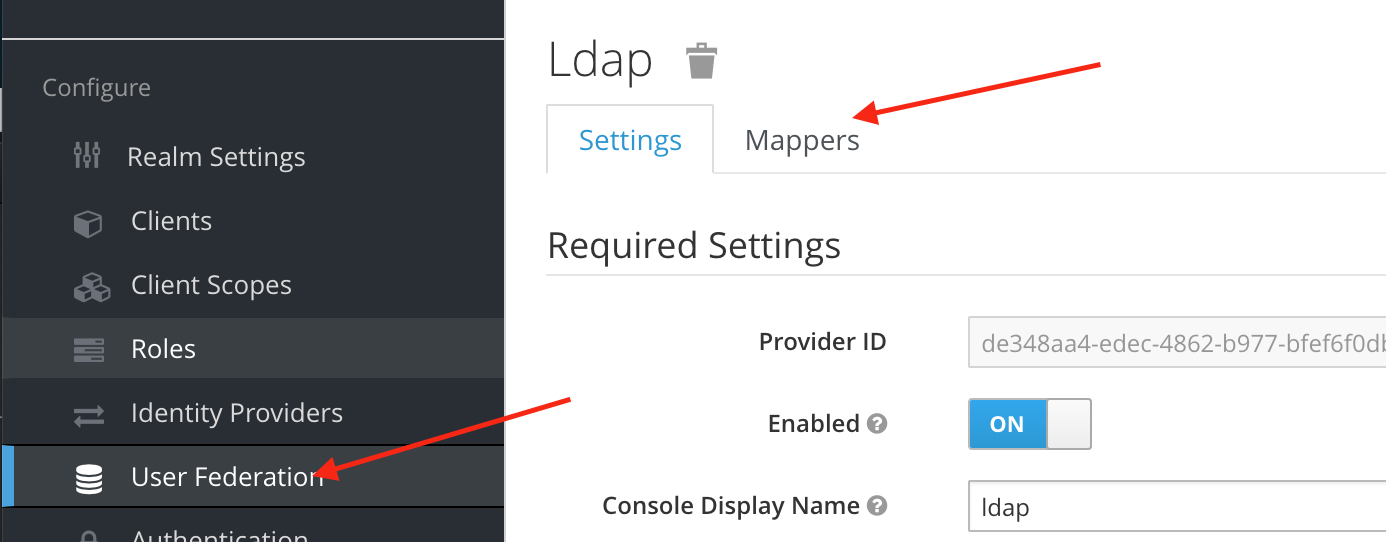
Once in the desired realm, click on User Federation, and click Add Provider. On the next page ("Required Settings"), set the following:
- Edit Mode : Writeable
- Vendor : Other
- Connection URL : ldap://openldap
- Users DN : ou=People,<your base DN>
- Authentication Type : simple
- Bind DN : cn=admin,<your base DN>
- Bind Credential : <your chosen admin password>
Save your changes, and then navigate back to "User Federation" > Your LDAP name > Mappers:
![KeyCloak Add Realm Screenshot]https://geek-cookbook.funkypenguin.co.nz/images/sso-stack-keycloak-3.png)
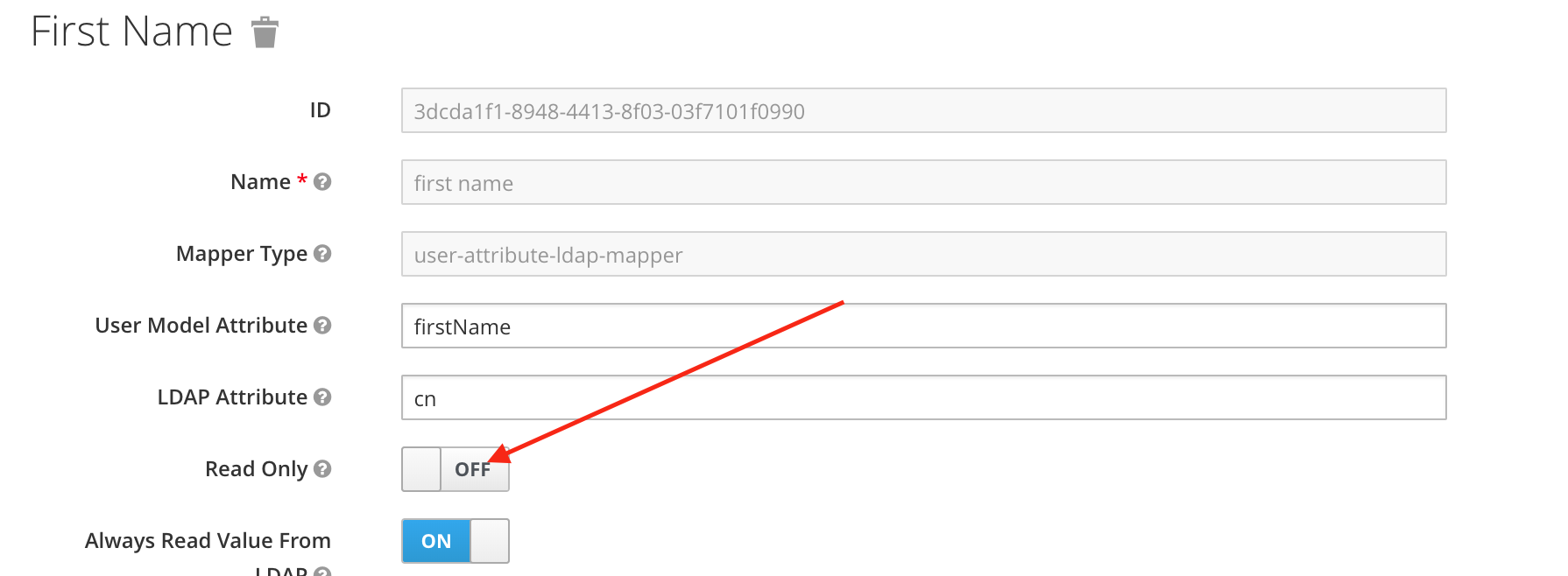
For each of the following mappers, click the name, and set the "Read Only" flag to "Off" (this enables 2-way sync between KeyCloak and OpenLDAP)
- last name
- username
- first name
![KeyCloak Add Realm Screenshot]https://geek-cookbook.funkypenguin.co.nz/images/sso-stack-keycloak-4.png)
Summary
We've setup a new realm in KeyCloak, and configured read-write federation to an [OpenLDAP]https://geek-cookbook.funkypenguin.co.nz/recipes/openldap/) backend. We can now manage our LDAP users using either KeyCloak or LDAP directly, and we can protect vulnerable services using [Traefik Forward Auth]https://geek-cookbook.funkypenguin.co.nz/ha-docker-swarm/traefik-forward-auth/).
!!! Summary Created:
* [X] KeyCloak realm in read-write federation with [OpenLDAP]https://geek-cookbook.funkypenguin.co.nz/recipes/openldap/) directory