mirror of
https://github.com/funkypenguin/geek-cookbook/
synced 2025-12-13 09:46:23 +00:00
 745dc26946
* Test updating CTA, using insiders version of mkdocs-material

* Dark mode, baby!

Signed-off-by: David Young <davidy@funkypenguin.co.nz>

* What will netlify do if I remove requirements.txt?

Signed-off-by: David Young <davidy@funkypenguin.co.nz>

* What will netlify do if I remove requirements.txt?

Signed-off-by: David Young <davidy@funkypenguin.co.nz>

* Only build the insiders version

Signed-off-by: David Young <davidy@funkypenguin.co.nz>

* Remove some broken links

Signed-off-by: David Young <davidy@funkypenguin.co.nz>

* Fix dead link

Signed-off-by: David Young <davidy@funkypenguin.co.nz>

* Remove twitter embed

Signed-off-by: David Young <davidy@funkypenguin.co.nz>

* Fix dead links

Signed-off-by: David Young <davidy@funkypenguin.co.nz>

* Mooar dead links

Signed-off-by: David Young <davidy@funkypenguin.co.nz>

* Final dead link

Signed-off-by: David Young <davidy@funkypenguin.co.nz>
66 lines
4.5 KiB
Markdown
66 lines
4.5 KiB
Markdown
# Contribute
|
|
|
|
## Spread the word ❤️
|
|
|
|
Got nothing to contribute, but want to give back to the community? Here are some ideas:
|
|
|
|
1. Star :star: the [repo](https://github.com/geek-cookbook/geek-cookbook/)
|
|
2. Tweet :bird: the [meat](https://ctt.ac/Vl6mc)!
|
|
|
|
## Contributing moneyz 💰
|
|
|
|
Sponsor [your chef](https://github.com/sponsors/funkypenguin) :heart:, or [join us](/#sponsored-projects) in supporting the open-source projects we enjoy!
|
|
|
|
## Contributing bugfixorz 🐛
|
|
|
|
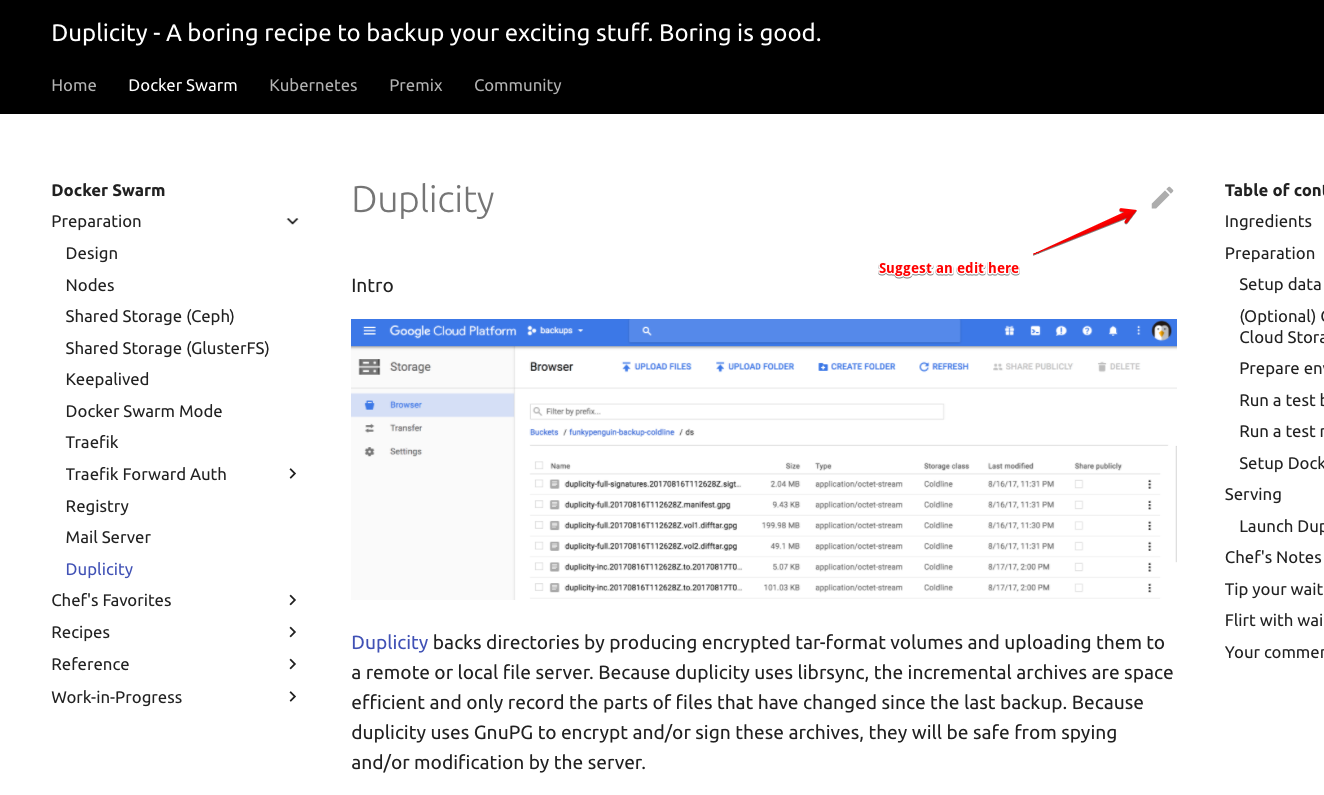
Found a typo / error in a recipe? Each recipe includes a link to make the fix, directly on GitHub:
|
|
|
|
|
|
|
|
Click the link to edit the recipe in Markdown format, and save to create a pull request!
|
|
|
|
Here's a [113-second video](https://static.funkypenguin.co.nz/how-to-contribute-to-geek-cookbook-quick-pr.mp4) illustrating the process!
|
|
|
|
## Contributing recipes 🎁
|
|
|
|
Want to contributing an entirely new recipe? Awesome!
|
|
|
|
For the best experience, start by [creating an issue](https://github.com/geek-cookbook/geek-cookbook/issues/) in the repo (*check whether an existing issue for this recipe exists too!*). Populating the issue template will flesh out the requirements for the recipe, and having the new recipe pre-approved will avoid wasted effort if the recipe _doesn't_ meet requirements for addition, for some reason (*i.e., if it's been superceded by an existing recipe*)
|
|
|
|
Once your issue has been reviewed and approved, start working on a PR using either GitHub Codespaces or local dev (below). As soon as you're ready to share your work, create a WIP PR, so that a preview URL will be generated. Iterate on your PR, marking it as ready for review when it's ... ready :grin:
|
|
|
|
### GitHub Codespaces
|
|
|
|
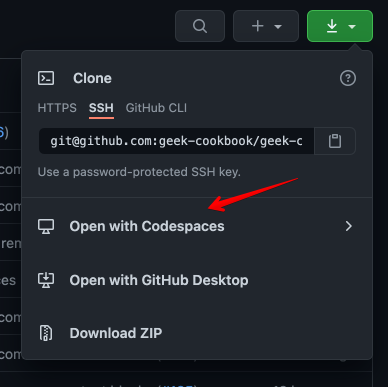
[GitHub Codespaces](https://github.com/features/codespaces) provides a browser-based VSCode interface, pre-configured for your development environment. For no-hassle contributions to the cookbook with realtime previews, visit the [repo](https://github.com/geek-cookbook/geek-cookbook), and when clicking the download button (*where you're usually get the URL to clone a repo*), click on "**Open with CodeSpaces**" instead:
|
|
|
|
|
|
|
|
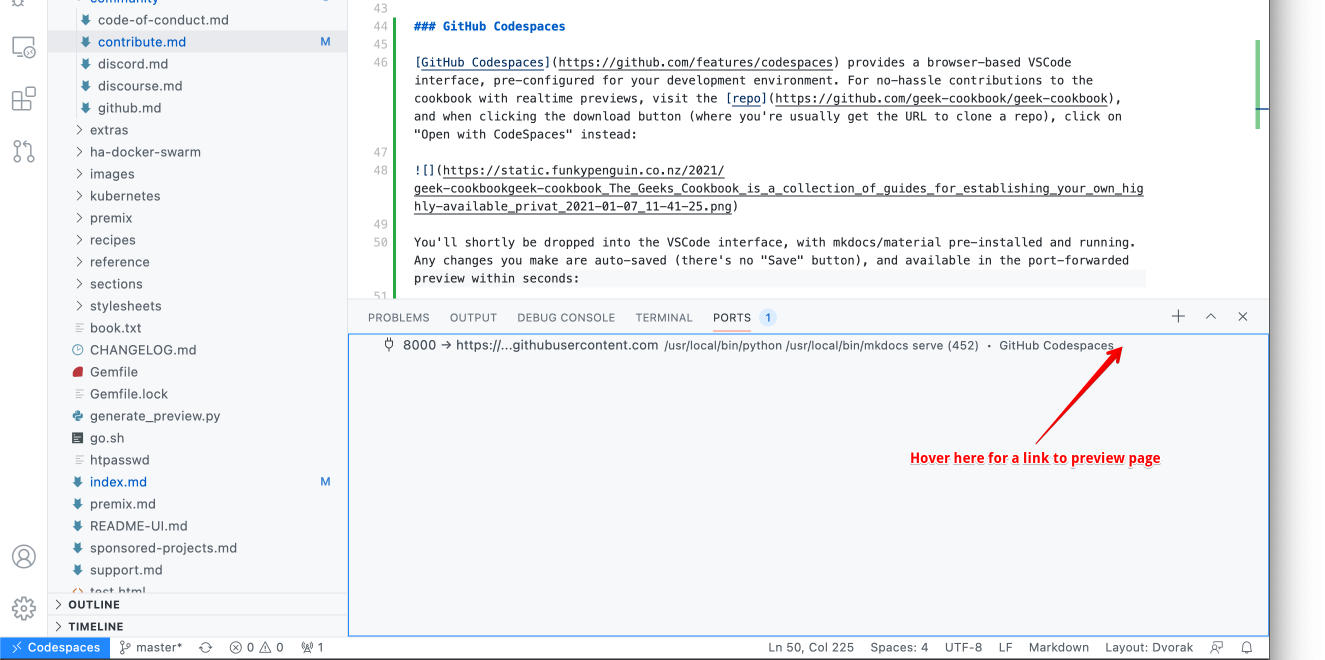
You'll shortly be dropped into the VSCode interface, with mkdocs/material pre-installed and running. Any changes you make are auto-saved (*there's no "Save" button*), and available in the port-forwarded preview within seconds:
|
|
|
|
|
|
|
|
Once happy with your changes, drive VSCode as normal to create a branch, commit, push, and create a pull request. You can also abandon the browser window at any time, and return later to pick up where you left off (*even on a different device!*)
|
|
|
|
### Editing locally
|
|
|
|
The process is basically:
|
|
|
|
1. [Fork the repo](https://help.github.com/en/github/getting-started-with-github/fork-a-repo)
|
|
2. Clone your forked repo locally
|
|
3. Make a new branch for your recipe (*not strictly necessary, but it helps to differentiate multiple in-flight recipes*)
|
|
4. Create your new recipe as a markdown file within the existing structure of the [manuscript folder](https://github.com/geek-cookbook/geek-cookbook/tree/master/manuscript)
|
|
5. Add your recipe to the navigation by editing [mkdocs.yml](https://github.com/geek-cookbook/geek-cookbook/blob/master/mkdocs.yml#L32)
|
|
6. Test locally by running `./scripts/serve.sh` in the repo folder (*this launches a preview in Docker*), and navigating to http://localhost:8123
|
|
7. Rinse and repeat until you're ready to submit a PR
|
|
8. Create a pull request via the GitHub UI
|
|
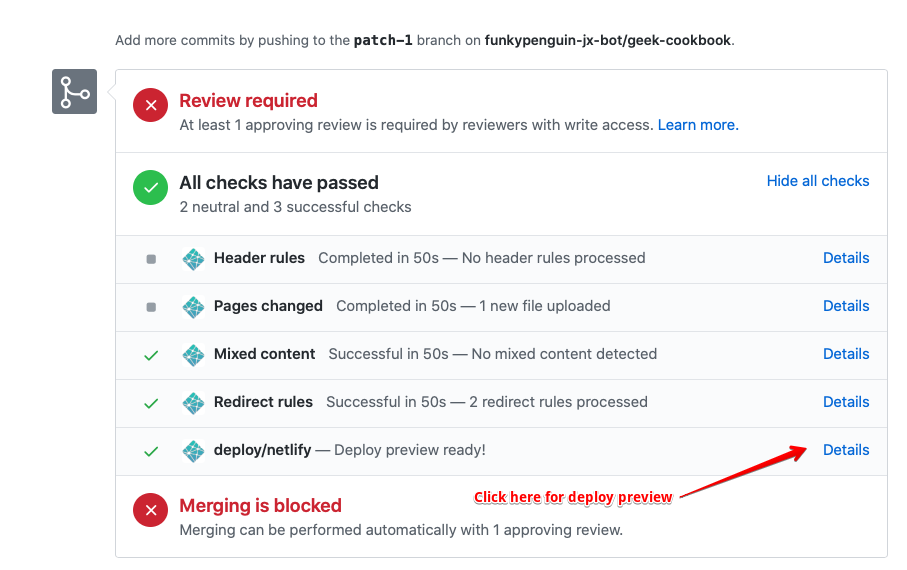
9. The pull request will trigger the creation of a preview environment, as illustrated below. Use the deploy preview to confirm that your recipe is as tasty as possible!
|
|
|
|
|
|
|
|
|
|
|
|
## Contributing skillz 💪
|
|
|
|
Got mad skillz, but neither the time nor inclination for recipe-cooking? [Scan the GitHub contributions page](https://github.com/geek-cookbook/geek-cookbook/contribute), [Discussions](https://github.com/geek-cookbook/geek-cookbook/discussions), or jump into [Discord](/community/discord/) or [Discourse](/community/discourse/), and help your fellow geeks with their questions, or just hang out bump up our member count!
|
|
|