 vorotamoroz
4.2 KiB
Hidden File Sync
Hidden File Sync is an advanced, optional feature for synchronising hidden files and folders, including selected content below .obsidian. It is separate from ordinary note synchronisation and is deliberately left disabled during Rebuild and Fetch setup operations.
Enable it only after ordinary notes synchronise correctly in both directions on every device.
Warning
Hidden files can control active Obsidian settings, themes, snippets, and plug-ins. Back up every Vault before enabling this feature. Do not use Hidden File Sync and Customisation Sync to manage the same files.
Choose the initial source
Enabling Hidden File Sync requires an initialisation direction:
Mergecompares the local and remote hidden-file state without declaring either side authoritative. Use this when both sides contain changes which must be retained, and review any conflicts.Fetchtreats the remote hidden-file state as authoritative and applies it locally. Use this on an additional device after the desired files have been uploaded.Overwritetreats this device's hidden files as authoritative and writes them to the remote database. Use this first on the device whose hidden files you intend to distribute.
Fetch and Overwrite can replace files on one side. Check the direction and the backup before continuing.
Review the file selection
-
Open Self-hosted LiveSync settings.
-
Open
Setup, findEnable extra and advanced features, and enableAdvanced features.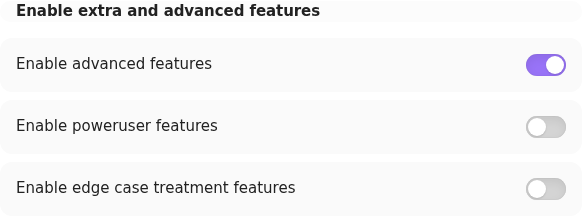
-
Open
Selector, then review theHidden Filessection. -
Use
Target patternsto limit the feature to the hidden files you intend to synchronise. An empty target list includes every otherwise eligible hidden file. -
Review
Ignore patterns. The default excludesnode_modules,.git, and Self-hosted LiveSync's own plug-in data.Add default patternsoffers aCross-platformset which also excludes Obsidian workspace files.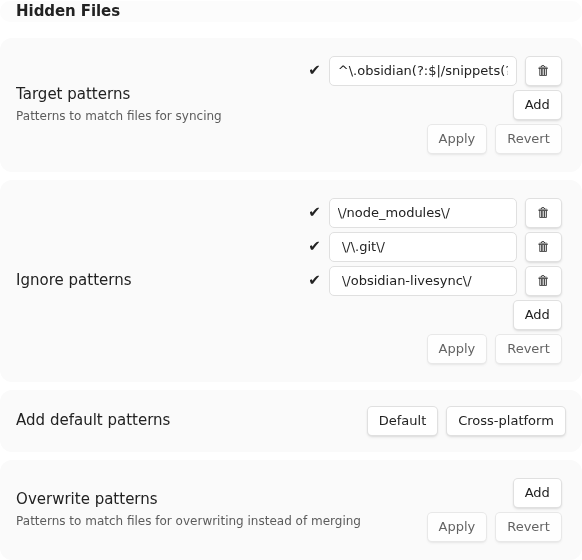


Prefer a narrow target list. Device-specific workspace state and another plug-in's credentials are usually poor candidates for cross-device synchronisation.
Target patterns also control directory traversal. A pattern must therefore match each parent directory as well as the intended files. For example, the following pattern admits the .obsidian parent and only its snippets subtree:
^\.obsidian(?:$|/snippets(?:/|$))
A pattern containing only snippets does not admit the .obsidian parent, so the scan cannot reach that directory.
Enable the first device
-
Open
Sync Settings, then find the advancedHidden Filessection.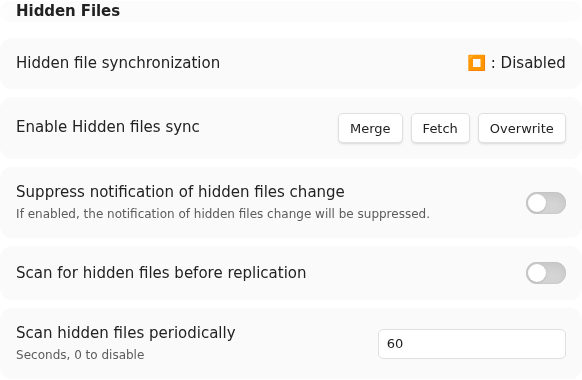
-
Under
Enable Hidden File Sync, select the initialisation direction chosen above. -
Keep Obsidian open while the initial scan and synchronisation finish.
-
Restart Obsidian when the completion Notice recommends it.
-
Confirm that the expected hidden files, and only those files, are present in the remote synchronisation state.

For the common source-of-truth rollout, select Overwrite on the authoritative device first.
Enable each additional device
Hidden File Sync must be enabled independently after ordinary setup on each device.
- Back up the additional device's Vault.
- Apply the same target and ignore patterns.
- Select
Fetchif the remote hidden files are authoritative. SelectMergeonly when local hidden-file changes must also be retained. - Wait for the initial scan and file application to finish, then restart Obsidian if requested.
- Verify representative files before enabling the feature on the next device.
If you later run Rebuild or Fetch as a recovery operation, expect optional features to be disabled again. Complete ordinary recovery first, then repeat this guide deliberately.
Related settings
The settings reference describes periodic scanning, scanning before replication, notification suppression, selectors, and overwrite patterns. Change those controls only after the basic Hidden File Sync path is working.